Connections and port forwarding
Port forwarding lets you reach a service through your SSH connection. A local forward opens a remote service on your computer; a reverse forward lets the server reach a service on your computer.
In this guide, local means the computer running Newport and remote means the Linux server selected in Newport. localhost and 127.0.0.1 mean the machine where you use that address: your computer in its browser, or the server in a Newport terminal.
Open a remote web app
- Start the app on the server, such as a development server listening on port
3000. - Select that server in Newport and open Connections.
- Find the port and turn on its Forward port switch. Needle discovers listening ports and groups them by project, worktree, or Compose project where possible.
- Open the displayed local address in your browser.
For example, if remote port 3000 is forwarded to local port 3000, open http://localhost:3000. If Newport uses a different local port, use the address shown in the app.
Port discovery requires Needle. You can still create a forward by number when discovery is unavailable.
Create a manual forward
Choose New forward in Connections, then fill in the form:
| Field | Local forward | Reverse forward |
|---|---|---|
| Name | A name for the connection | A name for the connection |
| Direction | Server port → this computer | This computer → server port |
| Local port or range | The port to open on your computer | The local service’s port |
| Remote port or range | The remote service’s port | The port to open on the server |
| Host/address field | Remote host: the service address as reached from the SSH server | Listen address on the server: the address on which the server accepts connections |
Choose Save forward, then turn on the saved forward’s switch in Connections. If you use port ranges, match their lengths so each local port has a corresponding remote port. You can assign a saved forward to a project when the form offers one.
Example: open a server app on your computer
Suppose your app is already listening on port 3000 on the Linux server. Create a forward with:
- Direction: Server port → this computer
- Local port or range:
8080 - Remote port or range:
3000 - Remote host:
127.0.0.1
Save it, switch it on, and open http://localhost:8080 in the browser on your computer. The remote host is relative to the SSH server, so 127.0.0.1 here reaches the server’s own app.
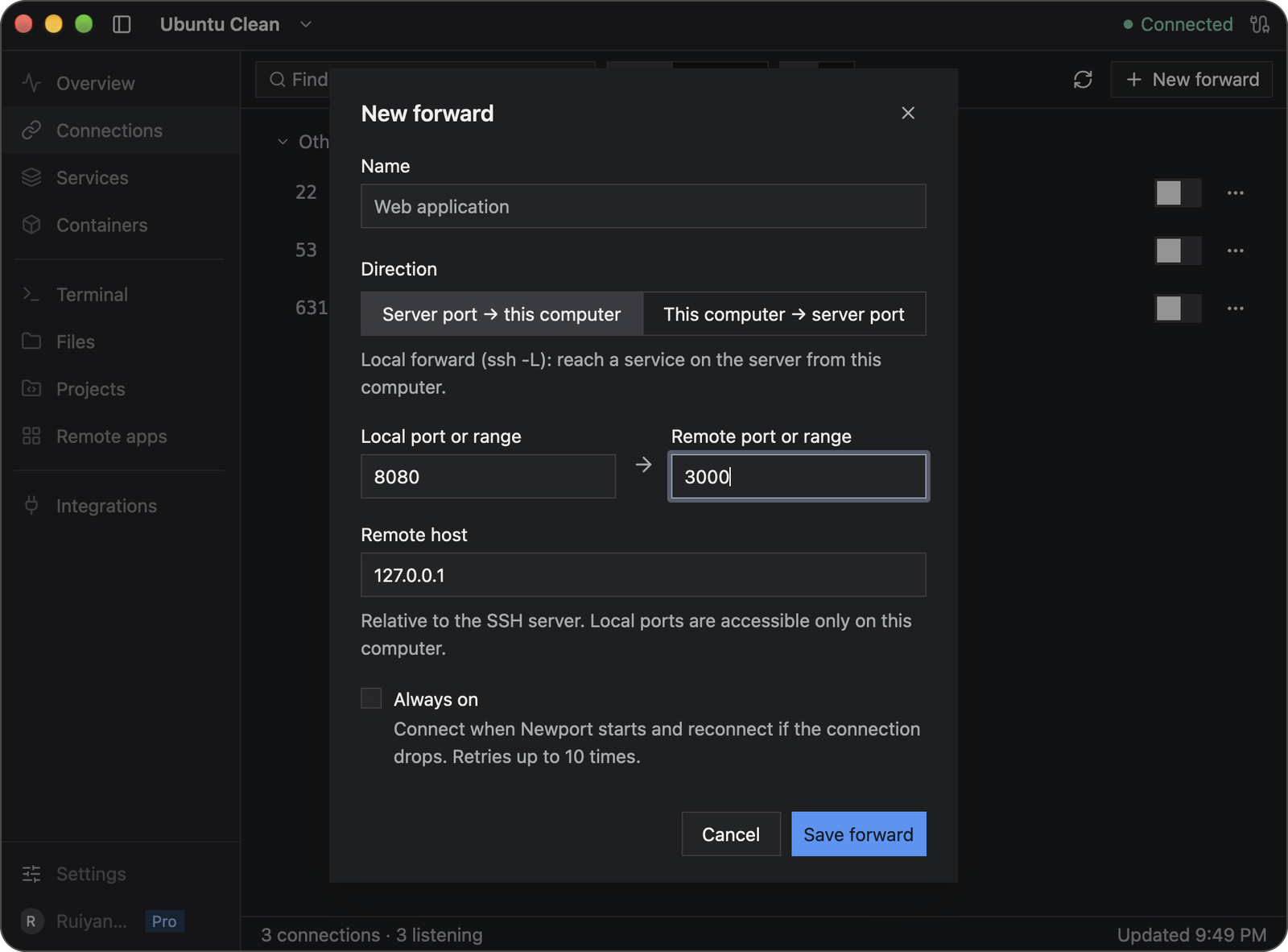
The two port fields correspond to different machines: 8080 on your computer and 3000 on the selected server.
Example: let the server reach an app on your computer
Suppose an app is already listening on port 3000 on your Mac or Windows computer. Create a forward with:
- Direction: This computer → server port
- Local port or range:
3000 - Remote port or range:
8080 - Listen address on the server:
127.0.0.1
Save it, switch it on, then run curl http://127.0.0.1:8080 in a Newport terminal on the server. The response comes from the app on your computer. This example assumes curl is installed on the server.
Keep the listen address at 127.0.0.1 to restrict access to the server itself. Other addresses require the SSH server’s GatewayPorts setting and can make your computer’s service reachable by other machines.
Keep a connection available
Enable Always on to connect when Newport starts and retry after a dropped connection. Newport retries up to ten times. If the connection remains down, resolve the problem and start it again.
Closing the main window keeps forwards running. Quitting Newport stops them. Disconnect a forward when you are done; removing a saved forward also removes its saved configuration.
Local forwards listen only on your computer’s loopback interface. They do not publish a service to other computers on your network.
Troubleshooting
| Problem | What to check |
|---|---|
| The port is missing from discovery | Confirm that the service is running and Needle is available; use New forward if needed |
| The local port is already in use | Choose another local port, such as 8081, and use it in your browser |
| The forward connects but the app does not load | Check the remote host and port, whether the service is listening, and whether it expects HTTP or HTTPS |
| SSH refuses forwarding | Ask the server administrator whether forwarding is allowed for your account |
| A reverse port is unavailable | Check whether the port is already in use on the server and whether its SSH policy allows the bind address |
| Reconnection stopped | Check the SSH connection, then manually start the forward again |
A forward only carries traffic; it does not start the application at the other end. For general SSH errors, see Troubleshooting.